
Custom LLM Optimization Tools: Build, Tune & Deploy Your Own AI Stack
- Date : 25-Jun-2025
- Added By : CAD IT Solutions
- Reading Time : 8 Minutes
INTRODUCTION
Large Language Models (LLMs) like GPT‑3 and Llama have revolutionized natural language processing. But using them off‑the‑shelf often leads to high latency, inflated costs, hallucinations, and mediocre domain accuracy. That’s where custom LLM optimization tools come in. Instead of settling for generic limitations, forward-thinking teams build tailored tools for prompt orchestration, model tuning, quantized inference, routing, and performance evaluation.
By building custom optimization tools around your LLM, you can:
- Fine-tune models for your domain with minimal overhead
- Quantize models for lightning-fast, low-resource inference on edge devices
- Route requests dynamically based on cost, latency, or accuracy needs
- Monitor output quality, fairness, and hallucination rates
- Continuously improve performance through A/B testing

In this post, you’ll learn:
- Why off-the-shelf LLMs often underperform
- What goes into a custom LLM optimization pipeline
- How to structure a production-ready architecture (with examples)
- Real-world case studies from different industries
- Best practices and mistakes to avoid
Whether you’re a startup CTO, engineering lead, or building AI into your product, this guide will help you take control of your LLM stack and turn it into something truly reliable.
Why Off-the-Shelf LLMs Aren’t Enough
LLMs offered by platforms like OpenAI or Hugging Face are designed for broad use—not for your specific domain or business challenges. They might perform okay, but not great, when real precision is needed. Here’s where they often fall short:
- Lack of domain knowledge: Generic models tend to hallucinate when dealing with legal, medical, or industry-specific data.
- Compute intensive: FP16 or FP32 weights demand expensive GPUs—making them hard to scale reliably.
- Static prompts: They don’t adapt to evolving tasks, user context, or business workflows.
- No intelligent routing: Every request is treated the same—whether it’s a quick lookup or a complex legal query.
The Role of Custom Optimization Tools in LLM Performance
Generic LLMs may be impressive, but they’re not tailored to your specific data, workflows, or business needs. To get real value—especially at scale—you need custom optimization tools that elevate how these models perform in your environment.
Let’s explore the core components of an optimized LLM stack and the tools powering them:
1. Prompt Optimization
What it is: Structuring prompt templates, testing multiple versions, scoring outputs, and using feedback loops to improve LLM responses without touching the model weights.
Tools:
-
- LangChain prompt templates
- PromptPerfect for automated prompt tuning
- LLMStudio by Microsoft for experimentation with prompt variants
- PromptLayer for tracking prompt performance and versioning
Why use it: Prompt design accounts for 60–80% of LLM effectiveness. Well-structured prompts reduce hallucinations, improve task adherence, and lower the need for fine-tuning.

2. Fine-Tuning & PEFT
(Parameter-Efficient Fine-Tuning)
LoRA (Low-Rank Adaptation): Introduces small trainable adapter layers while freezing most model weights—dramatically reducing GPU usage and memory overhead.
QLoRA (Quantized LoRA): Enables fine-tuning of massive models (like Llama-2 70B) on consumer GPUs by combining 4-bit quantization + LoRA adapters.
Advanced Variants:
-
- QALoRA: Fine-tuning that’s quantization-aware from the start
- ReLoRA: Merge adapters on-the-fly during training
- CLoQ: Combines quantization with curriculum learning for faster convergence
- MoRA (Modular LoRA): Applies modular layers per task for multi-domain tuning
Why it matters: You can personalize an open-source LLM (e.g., Mistral or Llama 3) to your company’s tone, terminology, and data—without needing an NVIDIA A100 or burning through API budgets.

3. Inference & Quantization
What it is: Shrinking the model’s memory footprint for faster, cheaper inference without significant performance loss.
Quantization Techniques:
- 8-bit (INT8), 4-bit (NF4) using bitsandbytes
- GPTQ, AWQ (Activation-Aware Quantization) for precise compression
- GGUF format with llama.cpp for CPU deployments
Inference Engines:
- DeepSpeed for distributed training + inference
- vLLM for optimized serving with parallel token generation
- Hugging Face TGI for production deployment
Edge Deployment Options:
- llama.cpp
- GGML for mobile/CPU
- Ollama for local model running + Docker compatibility
Why use it: Quantization can reduce memory usage by up to 75% and make large models deployable on laptops or Raspberry Pi 5s—great for privacy, cost savings, or on-prem systems.

4. Model Routing & A/B Testing
What it is: Intelligent model selection based on use case, workload, or user profile. Avoids using the same heavyweight model for every query.
Routing Tools:
- Optimix: Auto-routes prompts to the best model
- LangGraph: Directed graph of LLM chains with control flows
- Guardrails AI: Adds validation, constraints, and multi-model control
- Custom routing with FastAPI + Redis + model registry
A/B Testing Tools:
- Trulens: A/B test LLM apps with trace + eval
- Weights & Biases: Compare training runs and deployment variants
- PromptLayer: Versioning and testing of different prompts
Why it matters: Route customer service queries to a fast, cost-effective model and legal/compliance questions to a fine-tuned adapter. This balances cost, performance, and user satisfaction.

5. Evaluation & Monitoring
What it is: Measuring model performance in real-world conditions—not just BLEU or ROUGE scores, but accuracy, latency, fairness, and drift over time.
Monitoring Tools:
- DeepEval: Checks for hallucination, bias, task accuracy
- Opik: Evaluation toolkit for structured QA, summarization, RAG, chatbots
- Phoenix: Observability for LLMs in production
- Weights & Biases: Model training + production dashboards
- LangSmith: For tracing LangChain-powered LLM apps
Why it matters: If you’re deploying models at scale or in customer-facing roles, blind spots kill trust. Ongoing evaluation reveals:
- Where models break
- How hallucination rates evolve
- Whether model drift is impacting performance
- Where retraining is needed
By combining these components into a cohesive system, you build LLMs that are not just smart—but reliable, fast, accurate, and cost-efficient. You don’t just use AI. You engineer it for impact.

Architecture Example: Your Custom LLM Pipeline
Here’s a layered overview of a production-ready optimization stack:
- Prompt Bank & Orchestration: Store prompt templates in Git. Test locally via PromptPerfect or LLMStudio.
- Fine-Tuning Engine: Quantize base model to 4-bit. Train domain-specific connectors with LoRA or CLoQ.
- Quantized Inference Engine: Deploy adapters over quantized base. Use DeepSpeed or vLLM for batching and caching.
- Model Router Layer: Use Optimix or custom FastAPI router to direct queries based on type, cost, or urgency.
- Monitoring Dashboard: Capture latency, token costs, and error rates. Use DeepEval and W&B for insights.
- Iteration Loop: Trigger retraining or prompt updates based on quality thresholds.
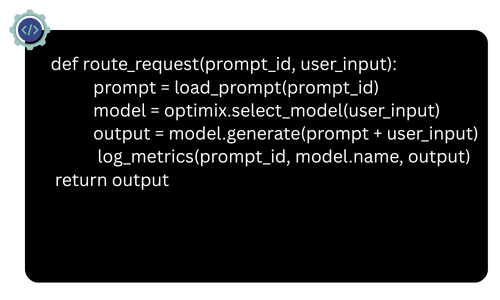
This modular pipeline enables selective adaptation, deployment, monitoring, and iteration.
Real‑World Use Cases: How Custom LLM Optimization Drives Impact
- Hallucination Reduction for RAG Systems:
AI legal assistants using RAG pipelines and hallucination detection tools like Galileo have achieved 4x fewer factual errors by pairing prompt tuning and fine-tuned adapters with trusted document retrieval. - Cost & Latency Optimization:
Optimix and MixLLM route simple queries to fast quantized models and complex queries to fine-tuned ones—cutting costs by ~60% while keeping accuracy high. - Domain‑Specialist Assistants
- Healthcare: Clinical-LLaMA improved AUROC by 4–5% using LoRA tuning.
- Legal: Compliance chatbots achieved 95–100% screening accuracy using fine-tuned adapters + prompt engineering.
- Enterprise Knowledge & Customer Service
- Retail: RAG bots fetch real-time product specs, reducing miscommunication.
- Internal Tools: Knowledge bases turned into interactive assistants with consistent context delivery.
- On-Device Hallucination Detection Local LLM deployments use transformer-based classifiers to flag hallucinations in real-time—running even on CPUs.
- Corrective RAG with Feedback Loops Corrective RAG setups evaluate context before generation, increasing relevance and grounding.
TL;DR Use Case Summary

Best Practices & Common Pitfalls
Best Practices
- Start Small: Begin with prompt tuning or a small LoRA adapter.
- Use Modular Architecture: Design components to plug-and-play.
- Track Everything: Use tools like W&B, LangSmith, and PromptLayer.
- Quantize with Care: Use 4-bit for inference, FP16 for adapters.
- Build Eval Loops: Automate quality checks and scoring.
- Design for Feedback: Capture user feedback and feed it into updates.
- Respect Privacy: Deploy locally for sensitive data, mask PII in logs.
Pitfalls to Avoid
- Over-engineering too early
- Ignoring messy, real-world inputs
- Skipping post-deployment monitoring
- Using one model for everything
A 5‑Step Starter Checklist
- Define a clear use case
- Build and test prompt templates
- Fine-tune lightweight adapters
- Quantize and deploy locally
- Add routing and set up monitoring

Key Takeaways
Custom LLM optimization tools let you move beyond generic chatbots to deploy intelligent systems that are accurate, fast, and aligned to your goals. With the right architecture, you don’t just use AI—you engineer it for real-world value.
Your Next Steps
Want to pilot a custom LLM pipeline without a big upfront investment?
CAD IT Solutions offers a 1‑week LLM optimization sprint:
- Analyse your use case
- Build prompt templates
- Fine‑tune or quantize a base model
- Deploy local inference + monitoring dashboard
